


MyStuff 2.0: McDonald’s UK Employee Portal Guide
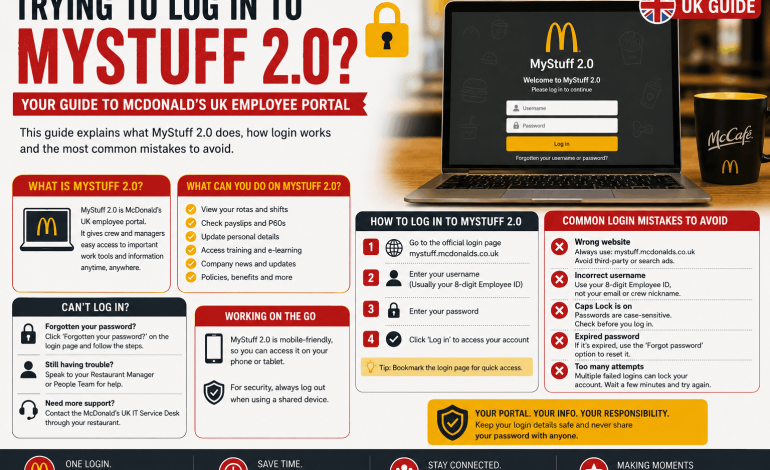

If you’ve just started at McDonald’s UK and someone’s mentioned MyStuff, it’s the company’s employee self-service portal, the place where staff check shifts, view payslips and update personal details online. MyStuff replaced older paper-based processes and manager-only systems with something staff can access themselves, from a phone or a computer, whenever they need it.
This guide covers what MyStuff actually does, how the login process works, what it costs to use (spoiler: nothing), and the mistakes that trip up new starters most often. There’s also a section on what to do if you can’t get in, since login problems are the single most common reason people search for this portal in the first place.
What Is MyStuff 2.0
MyStuff 2.0 is McDonald’s employee self-service portal used across UK restaurants, giving crew members, shift managers and franchise staff a single place to manage work-related tasks. It replaced older, more fragmented systems that relied on printed rotas and manager sign-off for basic requests.
Through the portal, staff can typically view upcoming shifts, download payslips, request holiday and update contact or bank details without going through a manager for every change. The exact features available can vary slightly between franchise-owned restaurants, since McDonald’s UK operates largely through franchisees who may run slightly different back-office setups.
[Image: person checking a work schedule on a smartphone]
How to Log In to MyStuff 2.0
Every new starter gets set up with MyStuff access as part of onboarding, and this is where the login details come from. There isn’t a single public web address that McDonald’s UK publishes for every restaurant to use, since access is typically issued through your specific store or franchise, so the safest way to find your login link is to ask your manager or check your onboarding paperwork rather than search for it online.
This matters more than it sounds. A number of third-party websites claim to host the “official” MyStuff login page, and they don’t all point to the same web address, which is a sign that at least some of them aren’t legitimate. Typing your employee ID and password into the wrong site risks handing your personal and payroll details to someone who has no connection to McDonald’s at all.
What you need before you log in
Once you have the correct link from your restaurant, you’ll generally need the following to get started:
- Your employee ID or work email, issued during onboarding
- A password, either set up for you or created on first login
- A stable internet connection, since some steps involve a verification code sent to your phone or email
If you’re logging in for the first time and haven’t been given credentials, ask your shift manager before your first shift rather than waiting until you’re on the clock.
What You Can Do Once You’re Logged In
Once inside, the portal is built around a dashboard that pulls together the tasks staff need most often. Typical sections include your upcoming rota, a payslip archive, a training or e-learning area, and a personal details page for updating your address, phone number or bank account for pay.
Most staff use it most for two things: checking next week’s shifts without waiting for a printed rota, and downloading a payslip when they need proof of income for something like a rental application or a loan. Training modules and company announcements tend to live in the same dashboard, so it’s worth a quick look even outside payday.
[Table: comparison of common MyStuff tasks showing what it’s for and how often you’d use it]
| Task | What it’s for | Typical frequency |
| Checking your rota | View upcoming shifts and any changes | Weekly |
| Downloading payslips | Get a digital copy for records or proof of income | Every pay period |
| Updating personal details | Change address, phone number or bank details | As needed |
| Holiday requests | Submit time-off requests digitally | Occasional |
| Training modules | Complete required e-learning | During onboarding, then periodically |
Is There a Cost to Use MyStuff 2.0
No, there’s no charge to staff for using MyStuff. It’s an internal tool provided as part of your employment, the same as a staff uniform or a work email address, so if you come across a site asking for payment or card details to “activate” your account, that’s a strong sign it isn’t the genuine portal.
Where cost does come into it indirectly is data usage if you’re checking the portal on mobile data rather than Wi-Fi, though this is a minor consideration for most people given how little data a schedule or payslip page uses.
Common Mistakes to Avoid
A handful of avoidable errors account for most of the frustration people report with MyStuff, and most of them are about account security or basic login hygiene rather than the portal itself.
- Searching generically for “MyStuff login” instead of using the link your restaurant gave you. This is how people end up on lookalike sites that aren’t run by McDonald’s.
- Reusing a password from another account. If that other account is ever compromised, your work login becomes vulnerable too.
- Ignoring the password reset option and repeatedly guessing. Too many failed attempts locks the account, which then needs a manager to unlock, wasting more time than a reset would have.
- Not updating bank details promptly after a change. Payroll runs on a schedule, so a late update can mean a payment goes to the wrong account for that period.
- Sharing login details with a colleague to check a shift on their behalf. It’s against most workplace policies and puts your personal payroll data at risk if their device isn’t secure.
What to Do If You Can’t Log In
Most login problems fall into a small number of categories, and working through them in order usually resolves the issue without needing to contact anyone.
Start by double-checking your employee ID and password are entered correctly, since a mistyped ID is the most common single cause of failed logins. If that doesn’t work, use the password reset option on the login page rather than guessing repeatedly, since too many failed attempts will lock your account and require a manager to unlock it. Clearing your browser cache or trying a different browser, such as Chrome or Edge, resolves a fair number of display or loading issues too.
If none of that works, the fastest fix is usually to ask your shift manager directly, since restaurant-level HR or admin staff can check account status and unlock or reset access far quicker than any online troubleshooting.
MyStuff 2.0 vs Older Systems
Some longer-serving staff will remember older tools like PeopleStuff, which MyStuff 2.0 has largely replaced across UK restaurants. The main difference reported by staff is that MyStuff consolidates rota, payslip and training access into one mobile-friendly dashboard, rather than requiring separate logins or manager involvement for routine tasks.
If your restaurant mentions a different system name, such as Harri, that’s likely a separate tool used for a specific function like recruitment or onboarding rather than a replacement for MyStuff itself. Since franchise-level setups can differ, it’s worth asking your manager which systems your specific restaurant actually uses rather than assuming every location runs identically.
FAQ
Q: What is MyStuff 2.0? MyStuff 2.0 is McDonald’s UK employee self-service portal, used by staff to check shifts, download payslips, update personal details and complete training. It replaced older, more manual processes that relied on printed rotas and manager sign-off.
Q: How do I log in to MyStuff? You’ll need your employee ID or work email and a password, both issued during onboarding, along with the specific login link provided by your restaurant. There isn’t one universal public web address, so avoid using links found through a general search and ask your manager if you’re unsure.
Q: Is MyStuff free to use? Yes, MyStuff is provided free as part of your employment with McDonald’s UK. Any site asking for payment or card details to access it isn’t the genuine employee portal.
Q: What can I do on MyStuff? You can typically view your upcoming rota, download payslips, request holiday, update personal and bank details, and complete training modules. Exact features can vary slightly between franchise-owned restaurants.
Q: Why can’t I log in to MyStuff? The most common causes are a mistyped employee ID or password, an account locked after too many failed attempts, or a browser issue. Try the password reset option first, and if that doesn’t work, contact your shift manager to check your account status.
Q: Is MyStuff the same as PeopleStuff? No, PeopleStuff was an older system that MyStuff 2.0 has largely replaced across UK restaurants. If your restaurant still refers to a different system, it’s worth confirming with your manager which tools are actually in use at your location.
Q: How do I get my payslip on MyStuff? Once logged in, payslips are usually found in a dedicated section of your dashboard, downloadable as a digital copy for each pay period. If you can’t find it, check with your manager, since layout can vary slightly between restaurants.
Q: My account is locked, what do I do? An account typically locks after too many failed login attempts as a security measure. Ask your shift manager to unlock it, since this is usually faster than any self-service option and avoids repeated failed attempts locking it further.