If you’re trying to get to your student finance login, the direct link you need is gov.uk/student-finance-register-login, which takes you to the Student Finance England sign-in page. From there you sign in with your Customer Reference Number (CRN) or registered email address and your password.
That’s the short answer. The rest of this page covers what you can actually do inside the account once you’re in, how to set one up if you’re new, how to recover your CRN or reset a forgotten password, what to do when the sign-in isn’t working, and why your account might look different if you’re in Scotland, Wales, or Northern Ireland.
Direct Link for Student Finance England Login
The official Student Finance England login sits at: logon.slc.co.uk/cas/login
You can reach it directly, or via the GOV.UK page at gov.uk/student-finance-register-login, which is the safer route because it confirms you’re on a genuine government service before you click through.
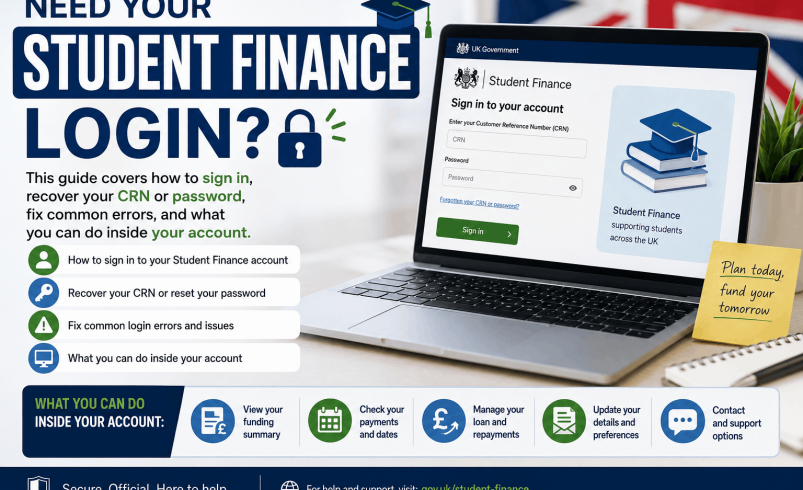
[Image: Screenshot of the GOV.UK student finance login page showing the “Sign in” button and the SFE branding]
Each time you sign in, you’ll need one of two things: your CRN or the email address you registered with, and your account password. You set up both when you first created your account. If you registered by post rather than online, Student Finance England will have sent you a letter containing your CRN and instructions for signing in.
What Is a Customer Reference Number?
Your CRN is a unique identifier for your student finance account. It appears on any letter or email you’ve received from Student Finance England or the Student Loans Company. It’s not the same as your National Insurance number, your UCAS number, or your university student ID. If you’re a parent or partner supporting a student’s application, you have your own separate CRN for your sponsor account.
What You Can Do Inside Your Account
Once you’re signed in to your student finance account, you can do most of the things you’d need to manage your funding without calling anyone.
The account lets you:
- Apply for finance as a new student, or reapply as a continuing student for each academic year
- Track the progress of an existing application and see what stage it’s at
- Check your payment dates and how much you’ll receive each term
- View statements and official letters from Student Finance England
- Update some personal details, such as your bank account number if you’ve opened a student account
- Reset your password or find your CRN if you’ve lost those details
- Give or manage consent for a parent or partner to support your application
If you’re a parent or partner whose household income is being assessed, you use the same GOV.UK login page and the same sign-in process, but you’ll access your sponsor account rather than a student account.
Student Finance England Login: How to Set Up an Account for the First Time
New students create their account at the start of the application process. You don’t need to have a confirmed university place before you set one up.
Step 1: Go to the application portal. Visit gov.uk/apply-for-student-finance and click the option to start a new application. This takes you through the account creation steps.
Step 2: Enter your personal details. You’ll need your National Insurance number, a valid UK passport (if you have one), and your contact details including an email address you can access regularly. The email you enter becomes one of your sign-in options.
Step 3: Receive your CRN. Once your account is created, Student Finance England assigns you a Customer Reference Number. Keep this somewhere safe. You’ll need it to log in throughout your studies and when you reapply each year.
Step 4: Set your password and secret answer. You create a password and a secret answer at account setup. The secret answer is used for some account recovery steps, so pick something you’ll remember.
Step 5: Complete your application. From this point you’re inside your account and can proceed with your student finance application. Applications for 2026 to 2027 take up to six to eight weeks to process, so applying early helps ensure your funding lands at the start of term.
You don’t need to create a new account each year. Returning students sign in with their existing details and select the reapply option. For the 2026 to 2027 academic year, Student Finance England encouraged continuing students to apply by 19 June 2026 to have funding confirmed for the September start.
How to Recover Your Student Finance Login Details
Forgetting a password or losing your CRN is one of the most common support issues Student Finance England deals with. The good news is you can recover both online in most cases without needing to call.
Forgotten Password
Go to logon.slc.co.uk/reset/details/pages/ForgotPassword.xhtml and follow the steps. You’ll be asked to confirm some personal details so the system can locate your account, then a reset link is sent to your registered email address.
Password reset emails come from the Student Loans Company. Before assuming the email hasn’t arrived, check your spam or junk folder and search for “Student Loans Company” in your inbox. If you’re using a university email address, log in to that rather than a personal account. Some students register with a university address and then lose access to it after graduating, which blocks the reset. If that’s happened to you, call Student Finance England directly: 0300 100 0607.
Forgotten CRN
Go to logon.slc.co.uk/reset/details/pages/ForgotCRN.xhtml to retrieve your CRN online. The system will ask you to verify your identity using personal details you provided when you registered.
Your CRN is also printed on any letter or email from Student Finance England, including payment notifications, application confirmations, and assessment letters. If you have any of those in a paper or digital folder, check there first.
If online recovery isn’t working, call 0300 100 0607. Advisors can locate your account using other personal details without you needing to supply the CRN upfront.
Reasons the Student Finance Log In Fails
Several things routinely prevent people from signing in even when they’re using the right credentials.
Caps Lock is on. Passwords are case-sensitive. This is the cause of more failed login attempts than almost anything else.
Autofill is using an old email. If you’ve changed your email address or you’re on a shared or family computer, the browser may be filling in a different email from the one you registered with. Try typing your details manually in a private browsing window.
You’re signed into the wrong account type. There are two separate portals: the Student Finance England application account (for students and sponsors during study) and the Student Loans Company repayment account (for managing your loan balance after you graduate). The credentials differ. Graduates who try to check their repayment balance on the SFE portal won’t be able to, because the SFE portal doesn’t show repayment information. The repayment portal is at repayment.slc.co.uk.
Your account is temporarily locked. Student Finance England’s system locks accounts after several consecutive failed login attempts as a security measure. The usual lockout period is around 30 minutes. Don’t keep trying during the lockout, as further attempts can extend it. Wait 30 minutes, then use the password reset route rather than attempting to guess again.
The service is down for maintenance. SFE schedules planned maintenance, usually at weekends and usually announced in advance. Check the GOV.UK student finance login page for any notice of downtime.
[Table: Student finance log in failure, likely cause, and what to do]
| What’s happening |
Most likely cause |
Fix |
| “Incorrect details” error |
Wrong email, old password, or Caps Lock |
Try in a private window; type manually |
| Password reset email not arriving |
Checking wrong inbox or spam folder |
Check junk; search for “Student Loans Company” |
| Account locked |
Too many failed attempts |
Wait 30 minutes; use password reset link |
| CRN not recognised |
Wrong number, or using old letter |
Use CRN recovery tool or call 0300 100 0607 |
| Portal shows repayment info missing |
Wrong portal (SFE vs SLC repayment) |
Graduates: go to repayment.slc.co.uk |
How the Student Finance England Login Differs from the Repayment Account
This trips up a lot of people, so it’s worth being clear about which account does what.
Your SFE student finance account (at logon.slc.co.uk) is used while you’re studying. It’s where you apply for and manage your Tuition Fee Loan and Maintenance Loan, upload evidence, check payment dates, and update your details.
Your SLC repayment account is a separate login used after you finish studying. It shows your outstanding loan balance, your repayment history, and lets you update your employment details so HMRC deducts the right amount from your pay. You can reach it at gov.uk/sign-in-to-manage-your-student-loan-balance. The login details are the same CRN and password you used for your SFE account.
Student Finance Login for Scotland, Wales, and Northern Ireland
Student Finance England only handles applications from students who normally live in England. If you live elsewhere in the UK, you apply to a different body and log in to a different account.
- Scotland: The Student Awards Agency Scotland (SAAS) administers funding. Apply at saas.gov.uk. The phone number is 0300 555 0505.
- Wales: Student Finance Wales handles applications. Log in and apply at studentfinancewales.co.uk. Phone: 0300 200 4050.
- Northern Ireland: Student Finance Northern Ireland manages funding. The portal is studentfinanceni.co.uk and the phone number is 0300 100 0077.
Which body you use depends on where you normally live before you go to university, not where your university is located. A student from Wales studying at a university in England still applies through Student Finance Wales.
[Table: Student finance login portals by UK nation]
| Nation |
Portal |
Phone number |
| England |
logon.slc.co.uk (via gov.uk/student-finance-register-login) |
0300 100 0607 |
| Scotland |
saas.gov.uk |
0300 555 0505 |
| Wales |
studentfinancewales.co.uk |
0300 200 4050 |
| Northern Ireland |
studentfinanceni.co.uk |
0300 100 0077 |
What Parents and Partners Need to Know About the Login
If you’re a parent or partner who’s been asked by Student Finance England to provide household income details, you use the same student finance login page at gov.uk/student-finance-register-login, but you sign in to your own sponsor account. Your account is separate from the student’s.
When the student reapplies each year, you’ll receive an email within approximately 24 hours asking you to sign in and update your income details. For the 2026 to 2027 academic year, SFE uses income from the 2024 to 2025 tax year for most assessments. You don’t usually need to provide payslips or P60s, as SFE checks income details directly with HMRC using your National Insurance number.
If you don’t have a National Insurance number, you’ll need to submit a paper form with supporting income documents instead.
Keeping Your Account Secure: What to Watch For
Student finance accounts are a regular target for scammers, especially in September and October when maintenance loan payments are released. The Student Loans Company paid approximately £2.2 billion in maintenance loans in September 2025, and fraudsters target that payment window deliberately.
Student Finance England will never ask you for your password by phone, email, or text. If you receive a message claiming to be from SFE asking you to click a link and enter your login details, treat it as fraudulent. The same applies to calls asking you to “verify” your bank details before a payment can be released.
When you genuinely change your bank details inside your account, Student Finance England sends a text message to your registered mobile number to confirm the change. If you receive a confirmation text for a change you didn’t make, contact SFE immediately on 0300 100 0607.
Suspicious emails can be forwarded to report@phishing.gov.uk. You can report scam texts by forwarding the message to 7726. If you believe your account has been compromised, call SFE straight away rather than trying to fix it online.
Student Finance Login: Frequently Asked Questions
Q: What is the direct URL for the student finance England login?
The sign-in page is at logon.slc.co.uk/cas/login. You can also reach it via gov.uk/student-finance-register-login, which links through to the same SFE login portal. Use your Customer Reference Number or registered email address along with your password to sign in.
Q: I’ve forgotten my CRN. How do I find it?
Go to logon.slc.co.uk and use the “Recover sign-in details” link. The system will ask you to verify some personal details. Your CRN also appears on any letter or email from Student Finance England. If online recovery fails, call 0300 100 0607 and an advisor can locate your account without your CRN.
Q: Why is my student finance login not working?
The most common causes are: Caps Lock turned on, autofill entering an old email, or your account being temporarily locked after too many failed attempts. Wait 30 minutes and use the password reset link at logon.slc.co.uk rather than guessing again. If the problem persists, call 0300 100 0607.
Q: Do I need a new account every year?
No. You use the same account throughout your studies. Each year you sign in and click the reapply option. Your CRN and password stay the same. You should always check your personal details are still correct when you reapply, as outdated bank details can delay payments.
Q: What’s the difference between the student finance account and the SLC repayment account?
The student finance account (at logon.slc.co.uk) is for managing your funding while you’re studying. The SLC repayment account is a separate portal at gov.uk/sign-in-to-manage-your-student-loan-balance for checking your loan balance and managing repayments after you’ve finished your course. The login credentials are the same, but they’re different systems.
Q: Can my parents log in to my student finance account?
No. Parents and partners have their own separate sponsor accounts at the same login page. They can’t access the student’s account. A student can give consent for SFE to discuss their account with a named person, but that doesn’t give the other person login access.
Q: What do I do if I receive a suspicious email about my student finance?
Do not click any links in the email. Student Finance England will never ask for your password or bank details by email. Forward suspicious emails to report@phishing.gov.uk and report scam texts by forwarding to 7726. If you think your account has been accessed without your permission, call 0300 100 0607 immediately.
Q: I live in Scotland. Where do I log in for student finance?
Students from Scotland apply through the Student Awards Agency Scotland (SAAS), not Student Finance England. The SAAS portal is saas.gov.uk and their phone number is 0300 555 0505. Welsh students use studentfinancewales.co.uk and Northern Ireland students use studentfinanceni.co.uk.