YouTube to MP4: Is It Legal, and What Are the Risks?
- August 18, 2026
- 0
Converting a YouTube video to MP4 with a third-party site or app breaches YouTube’s Terms of Service every time, and it’s also copyright infringement unless you own the
Converting a YouTube video to MP4 with a third-party site or app breaches YouTube’s Terms of Service every time, and it’s also copyright infringement unless you own the
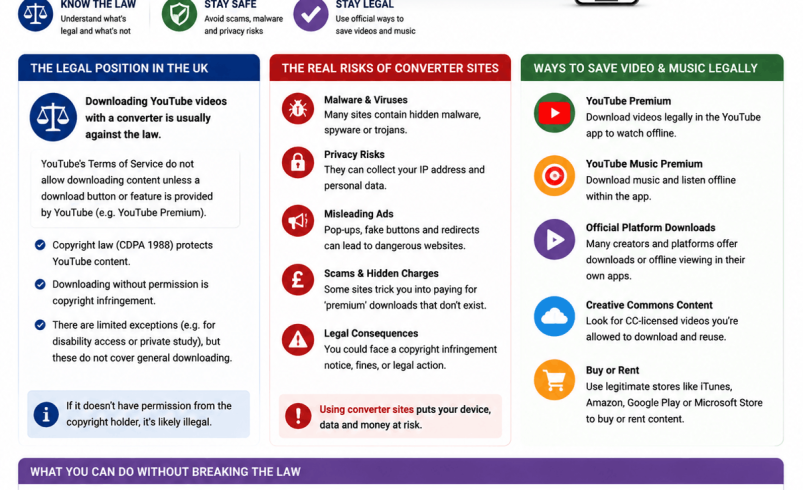
Converting a YouTube video to MP4 with a third-party site or app breaches YouTube’s Terms of Service every time, and it’s also copyright infringement unless you own the content or have permission to download it. This guide sets out the real legal position in the UK for youtube to mp4 conversion and youtube download music mp4 searches, the security risks that come with most converter tools, and the routes that actually are legal, including when downloading a YouTube video is genuinely fine.
Two separate things are in play whenever someone converts a YouTube video to MP4: YouTube’s own Terms of Service, and UK copyright law. They overlap but aren’t identical, and conflating them is where most confusion about this topic comes from.
YouTube’s Terms of Service prohibit downloading any video unless YouTube itself provides a download button or the rights holder has given you explicit permission. Breaching this is a contractual matter, not a criminal one. It can theoretically lead to your Google account being restricted or suspended, though in practice YouTube’s enforcement has focused on the operators of downloading tools and services rather than individual users doing it occasionally for personal use.
UK copyright law is separate, and it’s this layer that actually determines whether what you’re downloading is legal to have. If the content is copyrighted and you don’t own it, aren’t licensed to use it, and it isn’t covered by an exception, downloading it without permission is copyright infringement under the Copyright, Designs and Patents Act 1988, regardless of what tool you used to do it.
[Image: illustration contrasting a licensed download icon with a warning symbol, use royalty-free image from Unsplash or Pexels]
There are genuine cases where converting or downloading a YouTube video doesn’t raise either problem:
Outside these situations, most “youtube to mp4” searches are aimed at copyrighted music videos, films or TV clips that the person doesn’t own, which puts the download firmly on the wrong side of both YouTube’s terms and UK copyright law.
Setting the legal question aside, the practical case against most third-party YouTube to MP4 tools is strong enough on its own. These sites almost universally run on aggressive advertising rather than a subscription model, which is why so many are cluttered with pop-ups, fake “download” buttons that lead somewhere else entirely, and browser notification prompts.
That last one is worth calling out specifically: a genuine conversion tool never needs your permission to send browser notifications to convert a video. A pop-up asking you to “Allow Notifications” or confirm you’re “not a robot” before starting a download is a common trick used to sign you up for a stream of ad and scam notifications later, and clicking allow gives the site ongoing access to your browser to do it.
[Table: common risks on YouTube to MP4 converter sites, showing risk type, how it typically appears, and what it can lead to]
Beyond the ads, some converter sites bundle browser extensions or executable files disguised as the video you were downloading. Running an unfamiliar .exe file from a conversion site is a much bigger risk than the video download itself, and it’s one of the most common ways these tools end up installing genuine malware rather than delivering the file you asked for.
Music is where youtube to mp4 searches get the most legally clear-cut, and not in the downloader’s favour. Official music videos and audio uploaded by labels or artists on YouTube are almost always fully copyrighted commercial recordings, meaning converting one to MP4 or MP3 without permission is straightforward copyright infringement, not a grey area.
This is also the category that’s historically attracted the most enforcement action. YouTube-MP3.org, once one of the largest YouTube download sites, shut down in 2017 after Sony Music and Warner Bros brought a copyright infringement lawsuit against it. That case targeted the platform rather than individual users, which remains the pattern: rights holders and YouTube have consistently gone after the tools and services facilitating mass downloading, not people converting the occasional track for personal use, though that doesn’t make the download itself legal.
If what you actually want is offline access rather than specifically an MP4 file, there are several routes that don’t involve a third-party converter at all.
[Image: screenshot of YouTube’s Creative Commons filter option in search settings — use a genuine screenshot of the public YouTube interface]
Q: Is it illegal to convert a YouTube video to MP4? It depends on what you’re converting. If you own the content, it’s public domain, or it’s Creative Commons licensed, converting it isn’t illegal. If it’s someone else’s copyrighted video without permission, it’s copyright infringement under UK law, and it always breaches YouTube’s Terms of Service regardless of the content.
Q: Can YouTube ban my account for using a converter site? Yes, theoretically, since downloading videos without permission breaches YouTube’s Terms of Service. In practice, YouTube’s enforcement has focused on the operators of downloading tools and services rather than individual users converting the occasional video, but the risk to your account technically exists either way.
Q: Is youtube to mp4 illegal or just against YouTube’s rules? It’s often both, depending on the content. It always breaches YouTube’s Terms of Service, which is a contractual issue, and separately breaches UK copyright law if you don’t own or have permission to use the underlying video or music, which is a legal issue.
Q: Are YouTube to MP4 converter websites safe to use? Many are not. These sites commonly run aggressive advertising, fake download buttons and browser notification prompts designed to enable further ads or scams, and some bundle malware disguised as the downloaded file. Treat any site that asks for notification permissions or prompts you to run an executable file with real caution.
Q: How can I legally download YouTube music for offline listening? YouTube Music’s built-in offline download feature is the most straightforward legal route if you’re a subscriber, since it doesn’t involve converting anything through a third-party site. Buying the track through a licensed service like Amazon Music or Apple Music is the alternative if you want a file you own outright.
Q: What happens if I download a copyrighted YouTube video for personal use only? You’re still infringing copyright under UK law even if you never share the file, though individual prosecution for personal, non-commercial downloading is extremely rare. Rights holders have historically pursued the platforms and tools facilitating mass downloading rather than individual viewers.
Q: Is there a legal way to get an actual MP4 file rather than just offline app access? Yes, through Creative Commons licensed content, your own uploads, or content a creator has explicitly agreed to share with you as a file. YouTube Premium’s offline downloads and YouTube Music’s offline listening don’t produce a standalone MP4 you can move to another device, so they suit offline viewing rather than genuine file ownership.